Showing posts with label Window. Show all posts

Wednesday, 17 October 2012

How to Convert bytes into kilobytes, megabytes, gigabytes

Computer Storage is measured in terms of bytes, kilobytes, megabytes and gigabytes. We use different units of storage depending on actual size range of the storage medium. Sometimes, we need to convert data figure among different Storage Unit  format. For example: conversion of data in bytes to kilobytes or to megabytes and gigabytes units. We can easily make such conversion using quick online and offline tools.

Online conversion of bytes, kilobytes, megabytes, gigabytes

1. Use Google Search for quick conversion of figures among bytes, kilobytes, megabytes, gigabytes. For example: type convert 1024 bytes in kilobytes in search box and press the Enter key to get answer in the search results 1024 bytes = 1 kilobytes

Similarly, you can perform conversion of bytes into megabytes and gigabytee units online using Google Search Website.
2. Online tools for conversion between bytes, kilobytes, megabytes and gigabytes are also available. Use Online Conversion tools like on Calculate Me website for quick conversion between different type of units of storage in few simple clicks.

Free portable bytes unit conversion tool

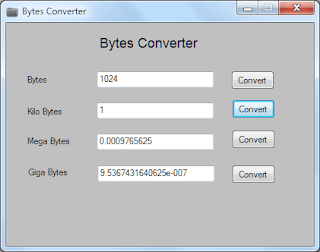
If you are not connected to internet all time, you can use offline alternative in the form of Bytes Converter tool. It is a free portable program for quick conversion between bytes, kilobytes, megabytes, gigabytes units.


Once you Download This program, double click to launch it. Enter number figure in any text box with specific units format and click Convert button to get required figure in respective Storage Unit formats.

Sunday, 14 October 2012

Angry Birds Star Wars Coming This November

Some days ago I was thinking about Angry Birds Star Wars edition. Now today I am posting that this is true. Angry Birds Star War Launching on Nov. 8, the game will recast the popular disgruntled flyers as "Star Wars" characters. 

However, "they are not Angry Birds dressed up as Star Wars characters," according to Paul Southern, Lucasfilm Ltd. vice president of licensing and consumer products marketing. "They are characters in their own right."

From the deserts of Tatooine to the depths of the Death Star – the game and merchandise will feature the Angry Birds characters starring as the iconic heroes of the beloved Saga. 

Promo art shows Luke Skywalker taking on the role of the iconic Red Bird, along with aviary adaptations of Princess Leia, Han Solo, Chewbacca, Obi-Wan Kenobi, C-3PO, and R2D2. The pigs, of course, will transform into the stormtroopers and even Darth Vader himself, with masks and helmets giving the traditional "Star Wars" villains an appropriately pig-like snout.

“This is the best Angry Birds game we’ve ever done. It’s the best parts of Angry Birds with all new cutting-edge gameplay set in in a galaxy far, far away,” said Peter Vesterbacka, the Mighty Eagle  and CMO of Rovio. “As a big Star Wars fan myself, I’m really excited about this new universe. The Force is definitely strong with this one.”
The game itself will follow the mold of the recently released Angry Birds Space, as planets from the "Star Wars" universe offer their own gravitational fields and environmental hazards from the desert of Tatooine to the freezing cold of Hoth.

All of the festivities begin on Nov. 8, The game will be available on iOS, Android, Kindle Fire, Mac, PC, Windows 8, and Windows Phone 8.

How to using ads in your Windows Phone apps

Windows Phone developers have three basic ways to make money from their apps: paid app sales, mobile advertising, and in-app purchases (coming in Windows Phone 8).
Advertising 101
If you’re new to the world of mobile ads, here’s a quick recap of how they work and a summary of the most common ad-related terms you’ll encounter.
On Windows Phone, mobile ad revenue is driven by the number of ads shown (“ad impressions”) and number of ads acted upon (“clicks”), as well as availability of ads to be served into the app at any given time (“fill rate”). Ultimately app developers are paid a certain “eCPM” (cost per mille, or thousand) for ads shown within their apps. To drive revenue, you want to create experiences that will add value to your customers while also driving ad impressions that garner the highest eCPM possible.


Driving more impressions
How do you do that? My first recommendation is an obvious one: create apps that are interesting and that drive engagement with lots of people. The more time customers spend in your app, the more ad impressions that are generated and the greater opportunity to solicit clicks.
By appealing to a broad audience, I’ve tried to make my own apps as “sticky” as possible. Here are some tricks I’ve learned:

  1. Make sure your app is intuitive to learn (clear instructions, visual examples) and easy to use (consistent, straight-forward navigation).
  2. Have an attractive UI, with compelling graphics and fluid animations.
  3. Adequately design and thoroughly test your apps to ensure it almost never crashes or stops, so users don’t get frustrated and continue to come back for more.
  4. Ensure the app caters to beginners and experts alike (for games, offer a super easy level for beginners to get them into the game with progressively more difficult levels for experts).
  5. Add social elements (global score tracking, sharing through social networks).
  6. Add online gameplay (allow users to keep playing or play each other whether on their phone or at a PC).
  7. Update the app frequently to keep it fresh and rekindle interest over time.
In addition to making my apps appealing, I also pay special attention to how ads are positioned on screen within my apps to help drive impression and clicks (without interfering with the experience):


  • Layout your apps such that ads shown integrate seamlessly with the user experience of your app.
  • Be selective about how and when ads appear. Too many or distracting ads will burn out users and will likely result in poor ratings and reviews.
  • Select the ad category in pubCenter that fits best with the type of users you expect to get.


    Turn On your PC With a Double Click Of Mouse

    Hello Friends in this Tutorial I teach you how to Turn On your PC With a Double Click Of  Mouse?

    Steps are here:

    1.) First start your computer.

    2.) Now open your BIOS Screen (usually “Delete”, “F2″, "F12" keys)
    3.) When the BIOS message appears to enter your CMOS configuration. Select Integrated Peripherals from main menu
    4.) If PS/2 mouse power on DISABLED, then activate it. It will became “Double-Click“
    5.) Press “Esc” key to exit.
    6.) Now save and exit.
    7.) Turn off your PC.
    8.) Now double-click the left mouse button. Your PC will turn ON !

    Enjoy our simple tricks.... 

    Saturday, 13 October 2012

    How To Uninstall Window 8

    If you are the one of those users who set up your PC to dual boot between Windows 7 and Windows 8 and now want to Uninstall Windows 8 From a Dual-Booting PC. You can do this easily without installing any app with a few clicks. I will tell to easiest method for this. First take the backup of your files and folders to external storage device. 

    You can do this in few steps:

    Step 1. First of all Hit the Windows+R button on your keyboard to open the Run box and type msconfig there and hit the OK button.

    Step 2. After this a windows open and here you can see lots of options like General, Boot, Services, Startup and Tools at top.

    Step 3. Now Hit on Boot option form the Windows.

    Step 4. Select the Windows 8 boot option. Click ‘Delete‘. Then Select the Windows 7 boot option. Click ‘Set As Default‘. 


    Step 5.  To check that the changes have been made, Reboot your windows PC

    Step 6. Now time to deleted Windows 8 from PC forever. Now press Windows Key + R andLaunch Disk management, type diskmgmt.msc into the run box. Form Here you can Delete the Windows 8 partition, to do this Right click on the Windows 8 partition and Select Delete Volume.


    How To Install Window 8 From USB Pendrive

    Windows 8 is the hot topic now these days. There is no such utility to install it through pendrive. But today i will give you a trick to install windows 8 through USB.

    Follow Simple Steps:

    Step 1: Take 4GB or more USB.
    Step 2: Download Window 8 and the Windows 7 USB/DVD tool
    Note: Windows 7 USB tool working fine with windows 8.
    Step 3: Create a bootable Windows 8 USB drive
    Insert the USB. Install the Windows 7 USB/DVD tool. Once the utility opens, you should be able to browse for and select the Windows 8 ISO. Start the process. The process takes about five minutes depending on the speed of your drive. You'll see a message that reads "backup completed" when it's done.


    Tuesday, 9 October 2012

    The Nokia Lumia 920 & 820 are coming to AT&T


    AT&T just made an announcement that’s bound to make many of you very, very happy – the Nokia Lumia 920 and 820 are officially part of the carrier’s fall lineup.
    You’re going to be able to get the Lumia 920 in-store in Red, Black and White, and through direct order (i.e., online) in Yellow and Cyan.  Read that last line again and notice what’s changed from the first time I took a look at the Lumia 920…Cyan is back!  I know that a some of you were bummed that Nokia wasn’t originally planning a Cyan Lumia 920 (me included), so I’m really glad to see that Nokia heard our feedback loud and clear.
    The Lumia 820 will be available only in black, but remember you can swap out the black shell with backplates in multiple colors.  Some of those shells add wireless charging if you want to go that route, which I highly recommend you do.  It’s life changing technology.

    Nokia Lumia 810 Phone

    A few weeks ago T-Mobile announced that it’s bringing the Window Phone 8X to its portfolio this fall. Today, it’s adding the Nokia Lumia 810 to the mix.The Lumia 810 is an exclusive to T-Mobile. Inside you’ll get the similar specs as the Lumia 820 - 4.3” ClearBlack display and 8MP Carl Zeiss camera.
    etc. - but you’ll also get a 1.2MP wide-angle Skype HD certified front-facing camera that’s 720p video-capable, a long-lasting 1800mAh battery, and optimizations to make it screaming fast on T-Mobile’s 4G network. It’s coming to T-Mobile in black, but you’ll be able to swap out the case for different colors.

    Thursday, 20 September 2012

    Microsoft Launched Comfort Keyboard

    I am currently using the Sculpt Comfort Keyboard at home PC. I spend a lot of time in front of this PC writing emails, blog posts, Typing and Chatting.It features Microsoft’s Contour Curve design – a six degree bend in the keyboard layout.It also has a removable palm rest if you prefer a more compact look and feel to the keyboard.The Sculpt Comfort Keyboard is also the first keyboard to feature a split backspace/spacebar key combo. This design decision was made based on research that showed 90% of typists use only their right thumb to press the spacebar. This leaves a ton of unused keyboard real estate on the left-side of the spacebar. The width of the spacebar is also increased to make it easier to strike while typing.This keyboard is designed to work great with Windows 8.It also has 4 additional hot keys for flipping between apps, switching apps, snapping apps, or bringing up the app bar.This keyboard price is $59.95 (U.S.).

    Wednesday, 19 September 2012

    HTC’s New Windows Phone 8 Launched

    This is the first devices with “Windows Phone” right in the name.This phones have eye-catching designs, Beats Audio technology for studio-quality sound, Back and Front Cameras are available in this phone.HTC's the 8X and 8S will be available on 150-plus carriers in more than 50 countries beginning in November.The Windows Phone 8X sports a 4.3-inch Super LCD to display with Gorilla Glass 2 protection and 720p resolution, a dual-core 1.5GHz processor, 16 GB of storage memoy, and two amazing cameras back end and front end. The 8MP rear camera shoots full 1080p video, while the front has a 2.1MP, 1080p-capable camera. HTC's 8 comes in many colors are available ( California Blue, Graphite Black, Flame Red, and Limelight Yellow ).


    Tuesday, 18 September 2012

    Top 8 Pinterest Pictures

    Hello friends...
    Pinterest is now a popular site. Recently it hit 10 million unique monthly views. A user spend 15.8 minute on pinterest and 12.1 minute on facebook. So It is more powerful and attractive. Most of the users on pinterest are females. But Today i am sharing some most funny pictures of pinterest. I hope that you will enjoy it.


    PayPal comes to Windows Phone

    Hello Friends Now Enjoy PayPal on-the-go with the PayPal Windows Phone app.The free app lets you send and request money,check your account balance , withdraw funds , and scan past transactions—anytime, anywhere.PayPal looks great on windows phone!The app’s Local feature shows you nearby stores using the PayPal Here service, so you can pay them via the app. Great Works , great app , super fast and fluid in this PayPal.Lets have more functionality.It is a better than android and ios version.

    Please note: Your country may not support all features.


    E*TRADE Mobile for Windows Phone

    Now traders and Wall Street watchers will also find that the free and official E*TRADE app for Windows Phone has landed. 
    The app lets you buy and sell stocks, set up alerts, get real-time quotes and financial news, and manage your E*TRADE account—all right from your phone.Download the app.With E*TRADE Mobile for Android, you can get real-time streaming quotes, place trades, manage your accounts, and more—all from your Android TM-powered device.
    Available to customers at no cost via Windows Marketplace,E*Trade Mobile For Window Phone features many of the same interface, security, trading, and cash management features available Click me Download .


    Two classic quiz shows go from TV to Windows Phone

     Hello Friends,
    Today I have a Two game shows Wheel of Fortune and Jeopardy .This games for the first time to Windows Phone Stores in the US, Canada, UK, and other markets. The Windows Phone game tests your knowledge on ranging topics from popular culture to world history.


    Wheel of Fortune ($4.99) Featuring over 1,800 puzzles crafted by the show writers, the Wheel of Fortune game you feel like a real life contestant! one of many single player modes or compete in Pass & Play multiplayer questions with your family and friends.It will appreciate the authentic sound effects, music, and graphics. you can have all of the sizzle of the popular game show in your hands.©2012 Califon Productions, Inc. "Wheel of Fortune" is a registered trademark of Califon Productions, Inc. All Rights Reserved.


    Jeopardy for Windows Phone ($1.99) features more than 2700 clues from the show’s writers and real-life announcer. Just like the TV show,  Johnny Gilbert’s voice as you take the stage and test your knowledge on topics ranging from popular culture to world history.This new Jeopardy! game puts America’s Favorite Quiz Show in your hands. © 2012 Jeopardy Productions, Inc. “JEOPARDY!” and “America’s Favorite Quiz Show” are registered trademarks of Jeopardy Productions, Inc. All rights reserved.

    Monday, 17 September 2012

    Custom Atari 2600 PC by Hard Drives Northwest


    Fast-forward 30 years, and still have some serious fans of all things Atari. Feeding on this energy, to develop a modern arcade - eight classic Atari games using HTML5 and supporting multi-touch. You can see and play these at . What’s more, the team that built these games has created an so that you can build your own games for the Atari platform.
    As a part of this classic Atari re-launch, a limited quantity of original Atari 2600 gaming consoles were retrofitted with modern PC internals. I was fortunate enough to get my hands on one of the Atari 2600 boxes that was put together by , and I’ll have to say it’s one of the coolest “case mods” I’ve ever seen!


    How much more processing power we have compared to the original:

    1.) Atari 2600 (1982): MOS 6507 Processor, 1 thread @ 1.19 MHz.
    2.) Custom Atari 2600 PC (2012):Intel Corei7 2600S Processor, 8 threads@3.4 GHZ

    So we basically have: 27,200 MHz / 1.19 MHz = ~22,857 times the processing power! That’s more than any kid from 1982 could wrap their head around…


    To startup this PC, you slide the power switch up and hold it momentarily. You may recall that the original Atari 2600 had a switch what would stay in the “on” or “off” position. This build involved swapping the original switch with a momentary switch (game reset). On this Atari, the game reset switch is hooked up to the PC reset line- so you have to be careful since it’s labeled “game reset” (it does more than that).


    I hooked this Atari 2600 PC up to a 47” TV and had to try out running in IE10 on Windows 8. The first game I tried out was Combat, and I was surprised at how much more sophisticated this updated version is. No “ping pong ball” projectiles to be seen, instead there are missiles that shoot out of the tank cannon complete with animated smoke.


    You can spend a lot of time playing these new games, especially when inspired by the classic lines of the Atari 2600! If you are inclined, this PC would also make a great dev box to write some of your own updated Atari classics with.

    There’s one more awesome detail on this Atari 2600 PC that makes it truly special: it’s been signed by Atari co-founder Nolan Bushnell. How cool is that!


    In case you wanted to know more about this project, here are the build details:
    • Motherboard: Intel Executive DQ67EP
    • Processor: Intel I7 2600S, hyperthreaded quad core, 3.4 GHz
    • RAM: Kingston DDR3 8GB
    • Storage: Intel 520 Sata 120GB
    • Graphics: ASUS EAH6570/DI/1GD3(LP) Radeon HD 6570 1GB 128-bit DDR3
    • Power Adapter: PICO PSU-160-XT 192W